Table of Contents
TL;DR: Patient intake automation cuts registration time, kills paperwork errors, and reduces missed appointments. Clinics that automate intake see faster check-in, cleaner data, and fewer empty slots on the schedule.
A packed waiting room does not mean a clinic is doing well. It usually means the front desk is buried in clipboards. Registration delays and missed visits quietly drain revenue at clinics of every size. Patient intake automation exists to close that gap between booking a visit and actually being seen.
Most clinics struggle here because they treat intake as a form to fill out, not a workflow that decides whether a patient shows up at all. This guide breaks down what it does, where it saves money, and how to pick a vendor that fits your clinic.
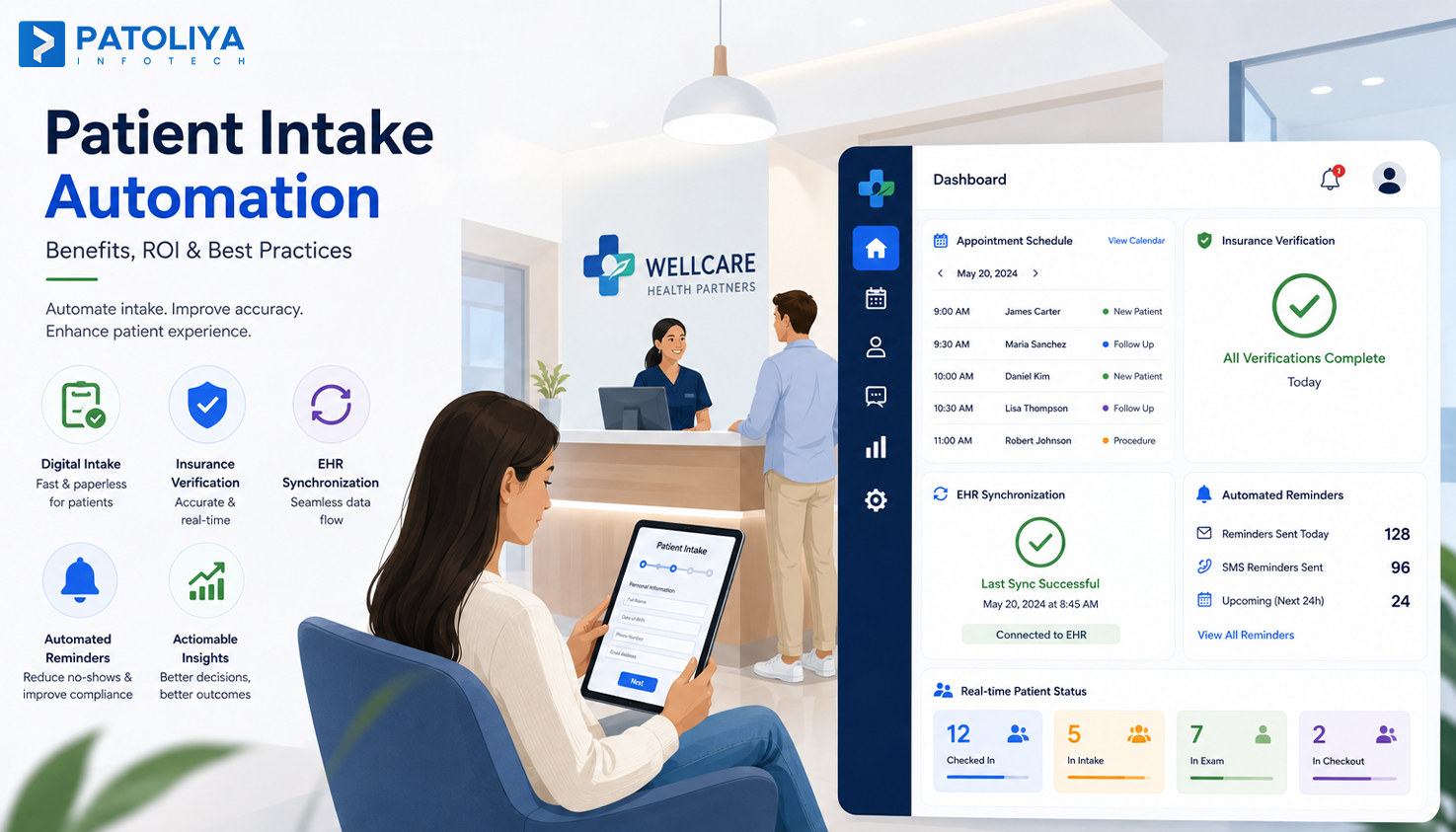
Patient intake automation replaces manual registration with software that collects patient data, verifies insurance, and updates the record before the visit starts. A booked appointment triggers a form, and the form triggers an insurance check.
A paper form asks the same questions every visit, by hand, in a waiting room. Digital patient intake software sends that form to a phone before the visit and flags anything missing.
A working setup needs four pieces working together: scheduling, digital forms, insurance checks, and EHR integration. Clinic workflow automation ties these into one pipeline, not four separate logins.
Staff shortages are not going away, and patients expect the ease of a banking app. Clinic workflow automation ties these into one pipeline, not four separate logins.
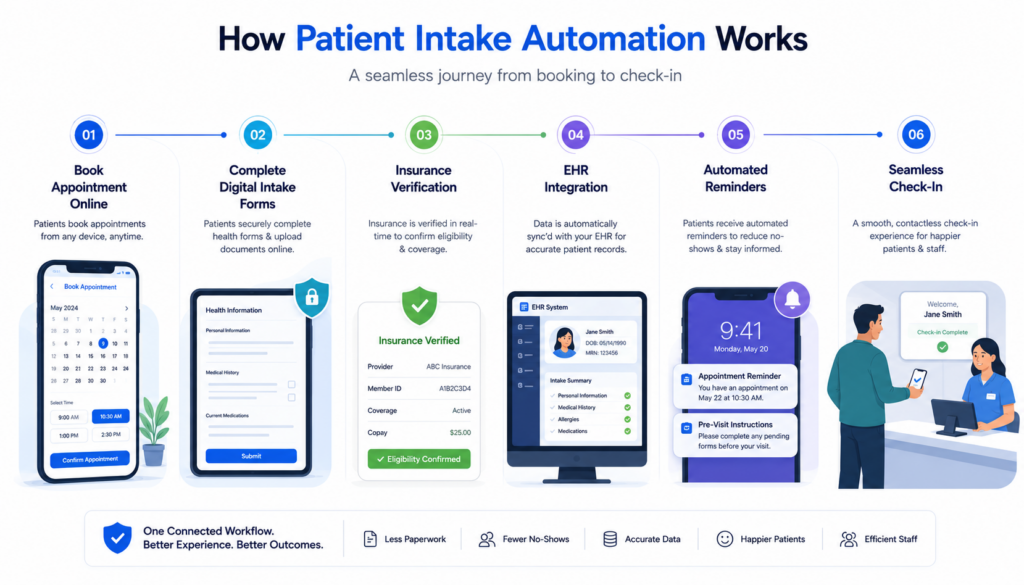
Patient intake automation platforms combine six functions into one pipeline, so patient information moves without a phone call or a fax.
This is where automation earns its keep. A clinic that automates the form but skips the reminder still loses patients to forgetfulness. Treat these six pieces as one connected clinic workflow automation system.
Most vendors sell one or two of these pieces and call it complete digital patient intake software. A clinic evaluating clinic workflow automation tools should ask which capabilities are native versus added through a third-party plugin.
Patient intake automation removes five bottlenecks that show up in almost every clinic, regardless of specialty.
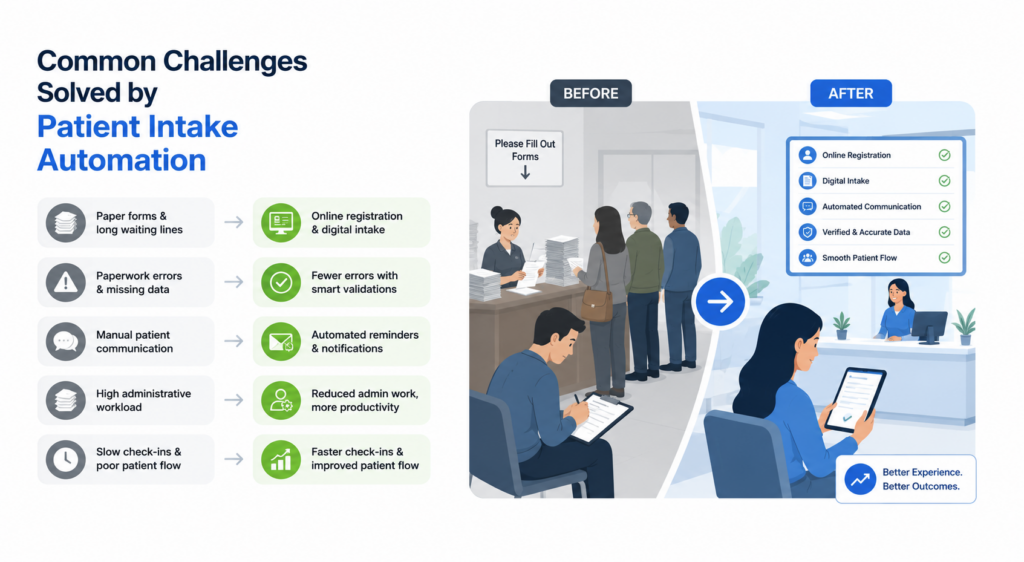
The software validates fields on submission, so a missing policy number gets caught before the visit, not after the claim bounces. Patient follow-up sequences built into intake platforms keep the relationship alive without added staff hours.
None of these problems fix themselves with a single tool. Real clinic workflow automation solves them together, because fixing registration speed while ignoring communication still loses patients between visits. Clinics that pair this with strong digital patient intake software see the biggest gains across all five bottlenecks.
Patient intake automation is not the same thing as a basic online form, and treating them as equal is where clinics waste budget.
| Approach | Administrative Effort | Patient Experience | EHR Integration | Scalability |
| Paper Forms | Very High | Poor | None | Low |
| Basic Online Forms | Moderate | Fair | Limited | Moderate |
| Patient Portal | Low | Good | Partial | Good |
| Patient Intake Automation | Minimal | Excellent | Full, real-time | High |
A patient portal still requires staff to manually reconcile data with the EHR. Full patient intake automation removes that manual step, which is the difference that shows up on a P&L statement.
A lot of vendors market a basic online form as digital patient intake software, then charge extra for features that should already be included. Ask for a live demo of the exact workflow above, not a slide deck.
A vendor demo can make almost any tool look good, so judge patient intake automation software against specific features, not a sales pitch.
Skip any patient intake automation platform that cannot show a live dashboard of who has completed intake before arrival. The best solutions also allow clinics to customize form logic by specialty, separating purpose-built healthcare software from generic workflow tools. A checklist like this makes it easier to compare vendors and eliminate unsuitable options early.
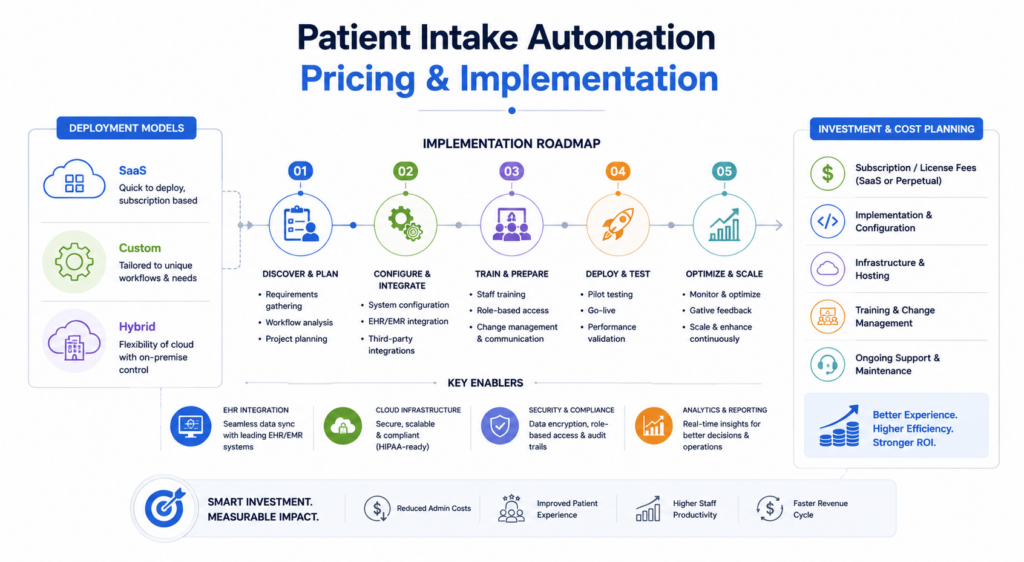
Cost scales with clinic size, and the sticker price rarely covers everything a clinic actually pays for digital patient intake software.
Small Clinic: A monthly SaaS fee per provider.
Multi-Specialty Practice: Custom workflows priced across departments.
Hospital or Enterprise: Custom contracts tied to patient volume.
Hidden costs often include EHR integration, custom workflow builds, staff training, compliance requirements, and ongoing maintenance. Ask every vendor for a full line item breakdown before comparing quotes.
Deployment models vary. SaaS is the fastest to launch. Custom development costs more upfront but fits complex specialty workflows.
A hybrid model mixes a SaaS core with custom modules. A clinic evaluating digital patient intake software should request a twelve-month cost projection, not just the monthly price.
Vendors selling clinic workflow automation as a bundle usually price it lower than buying each piece separately.
The return on patient intake automation shows up in five places, and clinics that track only one undersell the investment.
A clinic should compare no-show rates and staff hours per patient before and after rollout. That comparison is the honest way to prove patient intake automation paid for itself. Clinics running mature clinic workflow automation see the strongest numbers here, and digital patient intake software subscriptions typically pay back within two quarters.
Patient intake automation delivers significant benefits when implemented with the right planning, secure integrations, and a trusted technology partner.
HIPAA and Data Security: Every field, upload, and stored document must meet HIPAA standards.
Insurance Verification: Eligibility gets checked the moment a form is submitted.
Integration Complexity: EHR integration automation sounds simple in a sales deck, but it rarely is in a live system.
Staff Adoption: Front desk teams need real training time, not a fifteen-minute walkthrough.
Data Migration: Moving years of records into a new platform takes planning.
Vendor Lock In: Some platforms make it hard to export data later.
None of these risks is a reason to skip patient intake automation. There are reasons to pick a vendor with a track record in clinic workflow automation, specifically, not a generic form-building company. Ask any digital patient intake software vendor for references from clinics of your size before signing anything.
Selection of the right patient intake automation solution goes beyond comparing features. Evaluate vendors against the following criteria before making a decision.
| Criteria | Why It Matters |
| EHR Integration | Ensures patient data flows automatically into existing health records without duplicate entry. |
| Pre-Visit Digital Forms | Allows patients to complete registration before arrival, reducing check-in time and front-desk workload. |
| Digital Consent Management | Simplifies consent collection while maintaining compliance with healthcare regulations. |
| Appointment Reminder Automation | Reduces no-shows through automated SMS, email, or phone reminders. |
| Custom Workflow Configuration | Supports specialty-specific intake processes and adapts to different clinical workflows. |
| Insurance Verification | Confirms patient eligibility before appointments, minimizing billing errors and claim denials. |
| Analytics & Reporting | Provides insights into patient flow, registration efficiency, and operational performance. |
| Mobile Accessibility | Enables patients to complete forms securely from smartphones, tablets, or computers. |
| Implementation Timeline | Helps estimate deployment time and minimizes disruption to daily clinic operations. |
| Post-Launch Support & Maintenance | Ensures ongoing updates, technical support, and system reliability after deployment. |
These five companies are established players building patient intake automation and related clinic workflow automation software, each with a different specialty.
| Company | Founded | Team Size | Healthcare Expertise | Best For | Pricing |
| Patoliya Infotech | 2014 | 250+ | Patient intake automation, EHR integration | SMBs and Enterprises | Custom Quote |
| Chetu | 2000 | 2,800+ | Custom healthcare software, patient portals | Healthcare Providers | Custom Quote |
| Fingent | 2003 | 800+ | Healthcare workflow automation | Mid Market and Enterprise | Custom Quote |
| Intellectsoft | 2007 | 250+ | Digital health platforms | Enterprise Healthcare | Custom Quote |
| Oxagile | 2005 | 450+ | Healthcare software, AI development | Healthcare Organizations | Custom Quote |
Builds custom patient intake automation solutions that streamline onboarding and connect with existing systems.
Key Features: Custom workflow builds, secure EHR integration, HIPAA-compliant architecture.
Best For: SMBs and enterprise healthcare providers.
Pricing: Custom Quote.
Client Review: 4.8/5.
Delivers custom healthcare software with a focus on patient engagement and EHR integration. Its digital patient intake software covers both EMR and EHR platforms.
Key Features: EMR and EHR development, patient portal builds, and practice management tools.
Best For: Healthcare providers and medical practices.
Pricing: Custom Quote.
Client Review: 4.6/5.
Builds secure healthcare applications focused on operational efficiency through clinic workflow automation.
Key Features: Hospital management systems, workflow automation, secure architecture.
Best For: Mid-market and enterprise healthcare organizations.
Pricing: Custom Quote.
Client Review: 4.5/5.
Develops enterprise healthcare applications supporting digital patient experiences and regulatory compliance.
Key Features: Digital health platforms, mobility solutions, compliance tooling.
Best For: Enterprise healthcare organizations.
Pricing: Custom Quote.
Client Review: 4.5/5.
Specializes in custom software engineering for healthcare, including cloud-based and AI-powered tools.
Key Features: Cloud platforms, AI integration, and custom development.
Best For: Healthcare organizations adopting modern digital solutions.
Pricing: Custom Quote.
Client Review: 4.4/5.
Patient intake automation is not only for large hospital systems. Clinics of nearly every size see a return once volume passes a certain threshold.
Once a clinic begins handling a steady flow of new patients each week, manual intake often costs more in staff time than investing in patient intake automation. Healthcare providers of all sizes can benefit from streamlined workflows, with many starting by replacing paper forms with a digital intake solution before expanding automation across the clinic.
Patoliya Infotech builds patient intake automation tailored to how a specific clinic operates.
Patoliya Infotech has shipped digital patient intake software for single-location clinics and multi-site networks, and every build starts by mapping current clinic workflow automation gaps.
Schedule a free consultation with our healthcare experts to discover how patient intake automation can streamline your clinic and improve the patient experience.
Patient intake automation is no longer optional for clinics trying to stay efficient while patient expectations keep rising. The clinics winning on cost and satisfaction treat intake as a connected system, not a stack of separate tools.
Whether you run a single-location practice or a multi-site network, the right platform pays for itself through fewer no-shows and lower admin load. Partner with Patoliya Infotech to build a system designed around your patient volume. Let's talk about where your intake process is losing time.