Table of Contents
TL;DR: Document automation replaces manual keying with AI that reads, classifies, and validates documents before clean data ever hits your system of record. Most teams cut processing time and error rates within the first few months, but the real win comes from picking a platform that matches your actual document mix, not the cleanest demo file.
Organizations have automated workflows, modernized applications, and digitized records, yet document processing remains stubbornly manual. Invoices, contracts, claims forms, and other business documents arrive in countless layouts, forcing teams to spend valuable time extracting, validating, and entering data.
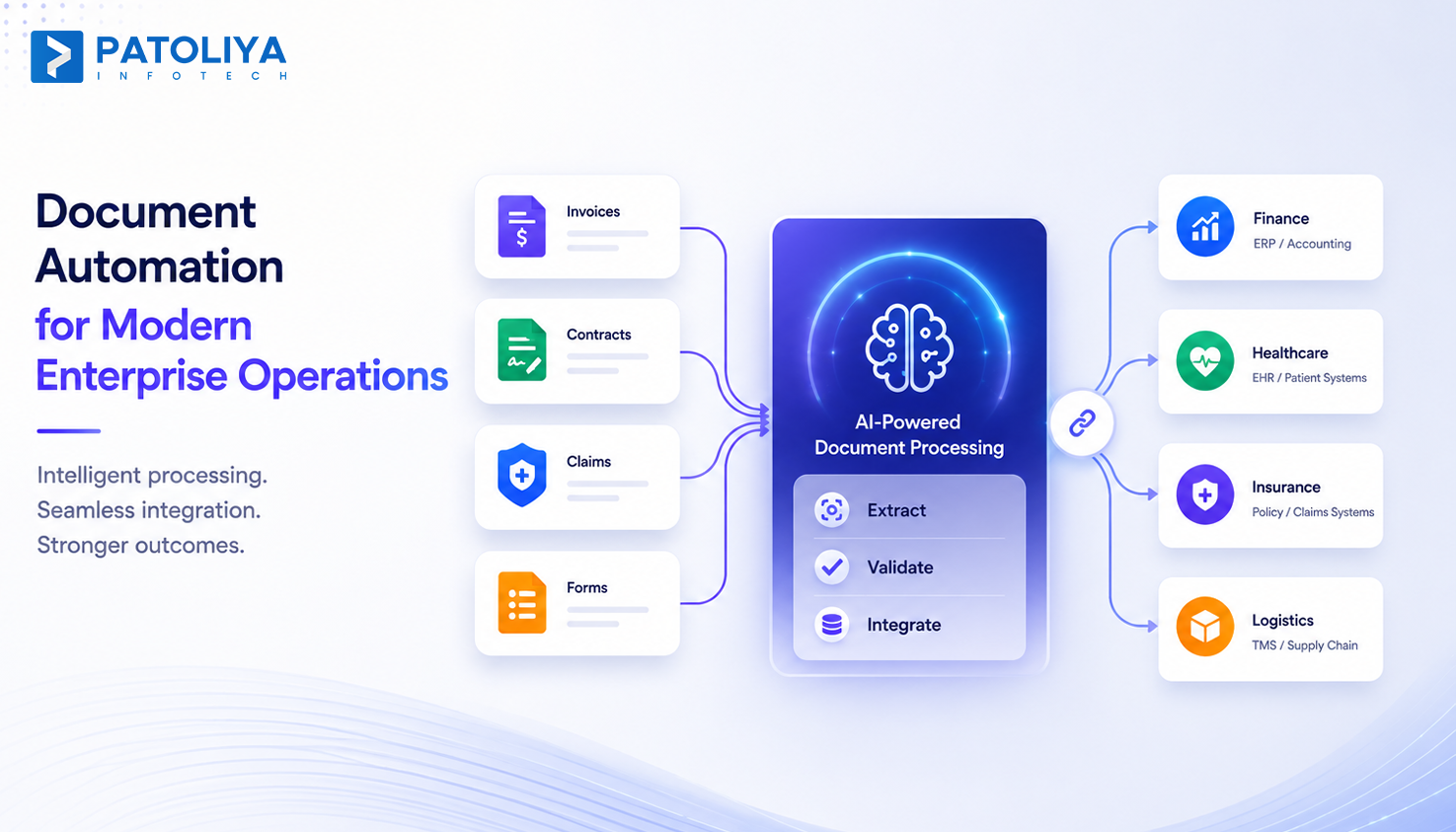
Document automation fixes this by reading, classifying, and validating documents before a human ever touches the data. The category sits at the intersection of intelligent document processing, machine learning, and workflow execution, and it is why operations teams are scaling without scaling payroll. This guide breaks down what document automation actually does, where it beats OCR and RPA, what it costs, and how to pick a vendor that will not waste your budget.
Document automation means software reads a document, pulls the right fields, checks them against your rules, and sends the data straight into your system of record. No one retypes anything. It works on invoices, claims, contracts, and intake forms the same way, just with different field maps for each document type.
Old school OCR AI only converts an image into text. It cannot tell an invoice number from a purchase order number, so someone still checks every field by hand. Document automation replaces that manual step with models trained to recognize document meaning, not just characters.
Document Automation vs Intelligent Document Processing vs RPA
These terms get mixed up constantly, and that confusion costs companies money on the wrong tool. Intelligent document processing is the AI layer that reads and understands a document.
RPA is the execution layer that moves approved data into other systems. Document automation is the umbrella term covering both working together as one workflow, and most vendors selling pure intelligent document processing still expect you to bolt RPA on separately.
Every document automation platform starts by capturing files from email, scanners, or upload portals, then classifying each one by type. Get this step wrong and every downstream extraction fails, since the system applies the wrong field map. The best setups route documents within seconds and flag anything they cannot confidently classify.
Structured forms like standard invoices are the easy case. The harder test is semi-structured claims forms and fully unstructured contracts where field locations shift every time. Strong AI document extraction models handle all three by reading layout and context together, not fixed coordinates, which is the real gap between cheap tools and platforms worth paying for. This is where mature intelligent document processing earns its budget.
Confidence scoring tells you which extracted fields the model trusts and which need a second look. A solid document automation workflow routes low-confidence fields to a reviewer automatically instead of forcing someone to recheck everything. This one feature separates platforms that scale from ones that quietly create new bottlenecks.
None of this matters if clean data cannot reach your ERP or claims system without a manual export step. Document automation earns its budget only when it connects directly into the systems your team already runs, through real connectors, not a spreadsheet someone uploads later.
Accounts payable teams drown in invoices the moment volume crosses a few thousand a month, and manual keying cannot keep pace without adding headcount. Invoice automation, a direct application of document automation, pays for itself fastest because invoices follow predictable formats that models learn quickly. Most AP teams now run on AI document extraction built specifically around invoice fields.
Claims forms and contracts do not follow a template, and that is exactly where most legacy tools fail. AI document extraction built for free text reads context across paragraphs instead of hunting for fixed boxes, which is the only way to get usable accuracy on this document type.
Manual entry leaves almost no trail of who touched what data and when, which becomes a real problem the moment an auditor asks. Document automation logs every extraction, correction, and approval automatically, turning audit prep into a quick export.
Growing transaction volume should not force a one-to-one increase in data entry staff. Document automation lets the same team absorb two or three times the volume because the software does the repetitive reading work, not the people.
Traditional OCR converts images into text, but document automation adds document classification, contextual data extraction, and business-rule validation to automate processing and reduce manual effort.
| Capability | Traditional OCR | Document Automation |
| Text Recognition | Yes | Yes |
| Document Classification | No | Yes |
| Field Extraction | Template Based | Context Aware |
| Validation Against Business Rules | No | Yes |
| Handling Multiple Layouts | Limited | Strong |
| Human Intervention Required | High | Low |
| Accuracy on Complex Documents | Moderate | High |
| Support for Unstructured Documents | Limited | Yes |
OCR can read numbers from invoices, but it cannot identify whether a value belongs to the subtotal, tax, or total field. Document automation understands document structure and context, reducing manual corrections and processing errors.
The IDP vs RPA discussion often creates confusion because the technologies solve different problems. RPA automates actions inside systems, while document automation focuses on extracting and validating information from documents before those actions occur.
| Capability | RPA Only | Document Automation With RPA |
| Reads Documents | Limited | Yes |
| Handles Unstructured Data | No | Yes |
| Invoice Processing | Rule Based | AI Driven |
| Contract Data Extraction | Limited | Yes |
| Adapts to Layout Changes | Poor | Strong |
| Workflow Execution | Yes | Yes |
| Manual Exception Handling | High | Low |
| Scalability | Moderate | High |
RPA workflows can break when document formats change. Document automation adds AI-powered extraction and validation, creating a more scalable and resilient process.
The license fee is rarely the real number. Integration work, model retraining, and the human review layer all add cost that vendors do not always show upfront.
Ask every document automation vendor for a total cost of ownership figure, not just a monthly quote.
Most vendors offer either per-page pricing or a flat enterprise contract, and the right choice depends entirely on your volume stability. Per-page pricing fits teams still scaling up. Flat contracts protect high-volume teams from surprise overage bills once document automation becomes core infrastructure.
The real ROI of document automation appears at scale. While costs may seem similar to manual processing at low volumes, automation becomes significantly more cost-effective as document volume grows. Intelligent document processing accuracy reduces rework and lowers the cost per document over time.
Service level agreements should clearly define AI document extraction accuracy, turnaround times, and remediation steps if performance falls below agreed targets on your actual documents.
Make sure these commitments are documented before signing the contract.
This checklist works across industries because the failure points stay the same whether you process invoices, claims, or contracts.
ABBYY built its name on OCR and expanded into full document automation with a deep library of prebuilt extraction models.
The platform leans on intelligent document processing for structured forms and fits teams wanting broad coverage without training custom models from scratch.
Key Features:
Best For: Teams wanting wide coverage without heavy custom model work.
UiPath pairs document automation with its native RPA execution layer, so extracted data moves straight into downstream bots without a separate integration step.
This fits teams already running RPA who need an AI document extraction layer added on, not a standalone tool.
Key Features:
Best For: Companies already running UiPath RPA that want extraction built in.
Hyperscience focuses on accuracy for handwritten and low-quality scanned documents, an area where most document automation platforms struggle.
Government agencies and large insurers rely on it because intelligent document processing on messy paper forms is its core specialty.
Key Features:
Best For: Organizations processing large volumes of handwritten or poor quality scans.
Rossum offers a cloud native, no-code approach to document automation built for fast-moving accounts payable teams.
Its AI document extraction engine focuses on getting AP workflows live quickly, which fits smaller finance teams better than enterprise-heavy platforms.
Key Features:
Best For: Finance teams wanting quick AP automation without a long rollout.
Tungsten Automation, formerly Kofax, combines document automation with workflow orchestration, RPA, and AI copilots under one platform.
It fits large enterprises running document-heavy processes across departments where intelligent document processing needs to connect into broader process management.
Key Features:
Best For: Large enterprises needing extraction tied into broader workflow orchestration.
| Platform | Core Strength | Best Fit |
| ABBYY | Broad prebuilt model library | Organizations needing wide document coverage |
| UiPath Document Understanding | Native RPA integration | Businesses already using UiPath |
| Hyperscience | High accuracy for handwriting and poor-quality scans | Government agencies and high-volume insurers |
| Rossum | No-code accounts payable automation | Fast-moving finance teams |
| Tungsten Automation (TotalAgility) | Workflow orchestration and document extraction | Large enterprises with multiple departments |
Patoliya Infotech builds document automation workflows around your actual document mix. The team handles AI document extraction for invoices, claims, and contracts, then wires the clean output directly into your ERP so nothing sits in a manual review queue longer than it has to.
Book a technical scoping call and bring your messiest invoice or claim form. That single document usually tells us more about fit than any feature list.
Document automation has moved past pilot projects and become standard infrastructure for any team buried in invoices, claims, or contracts. The platforms differ mainly on coverage, integration depth, and how they handle messy unstructured paper, not on flashy demo features. Test any shortlisted vendor against your hardest documents before signing anything. Let's talk through your document mix and find the approach that fits your volume and systems.