Table of Contents
TLDR: Cloud repatriation is the process of moving workloads from public cloud back to on-premises or private infrastructure. It is a financially driven architectural correction. Gartner projects that by 2027, more than 50% of enterprises will revisit workload placement decisions made during cloud migration.
Cloud was sold as cheaper. For many workloads, it is not. A predictable database workload that costs $18,000 per month on AWS can run on owned hardware at $4,200 per month, amortized over three years. That math is driving a serious conversation in boardrooms. Cloud repatriation is the structured process of moving specific workloads back to on-premises or private infrastructure when the cloud cost model no longer fits the business model. This blog explains what cloud repatriation involves, what it costs, and how to decide if your organization is a candidate.
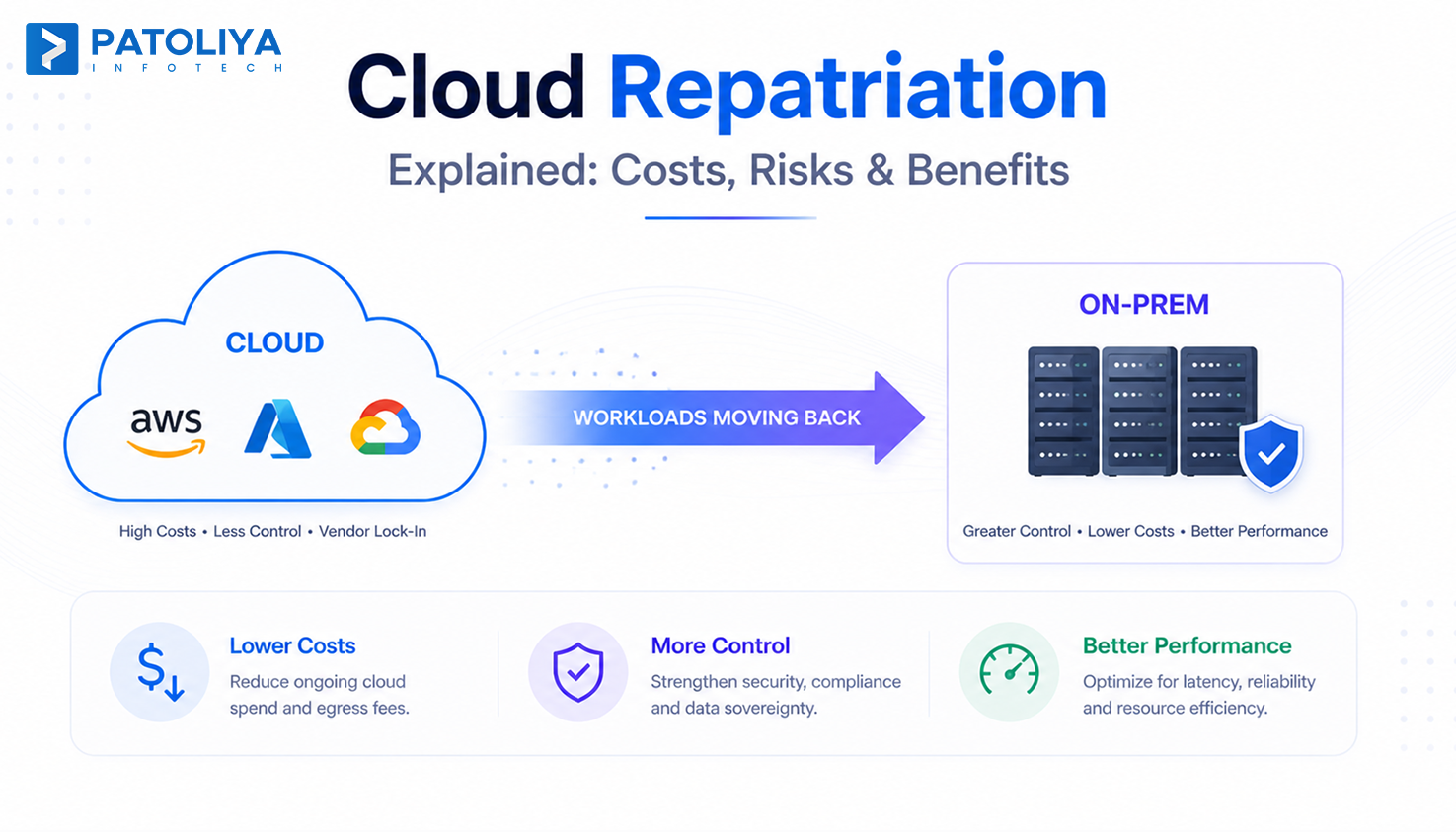
Cloud repatriation is the process of moving workloads back on-premises or to private infrastructure after a public cloud migration. Most organizations repatriate specific workloads to a steady-state, high-utilization, or compliance-sensitive environment, while keeping burst and cloud-native workloads in the public cloud.
It is a workload placement decision, not a technology rejection. The organizations doing it are pro-margin, not anti-cloud.
What It Replaces
Before cloud repatriation, IT teams had two choices: absorb rising cloud costs or rebuild infrastructure from scratch. Neither worked. It offers a third path, targeted workload migration for cases where on-premises vs cloud cost math favors owned infrastructure.
How It Differs from Adjacent Terms
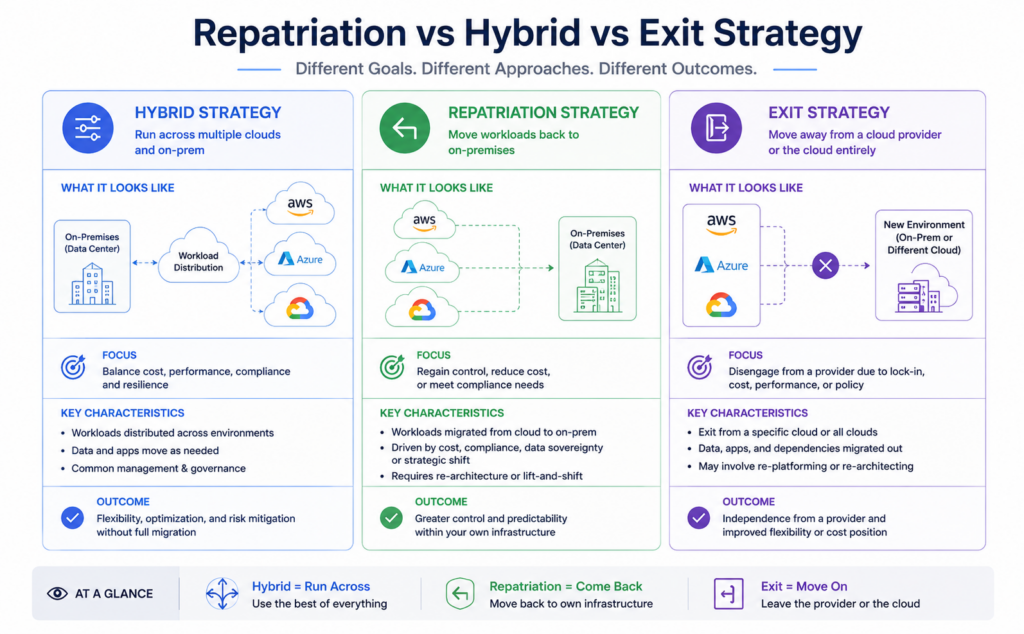
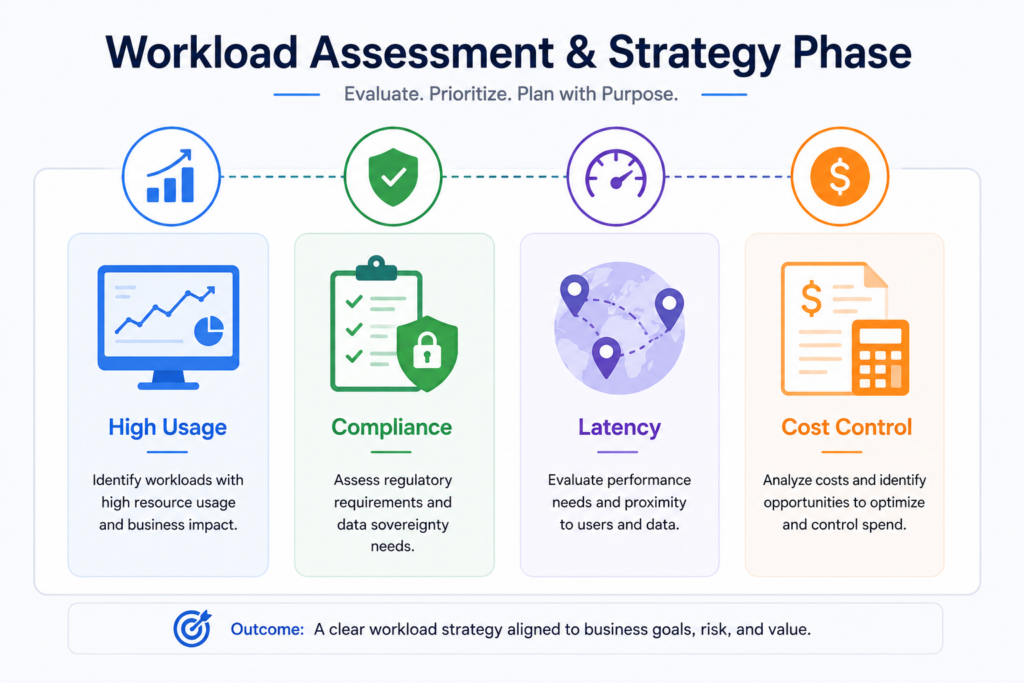
Every cloud repatriation project starts with a workload inventory. Without it, teams discover mid-migration that applications share dependencies nobody mapped. A formal assessment produces a complete cloud repatriation roadmap with workload classification, dependency mapping, and cost modeling.
Assessment outputs:
Moving workloads back on-premises requires hardware procurement before migration begins. Lead times run 4 to 12 weeks. This is the most underestimated timeline risk in any cloud repatriation program.
Egress fees make repatriation data migration more expensive than a standard cloud migration. Moving 50TB out of AWS at $0.09/GB costs $4,500 in egress alone. Every cloud exit strategy must include egress cost modeling before the first byte moves.
Validation steps every migration needs:
Applications built on AWS Lambda, Google Cloud Run, or Azure Cognitive Services create major migration challenges for cloud-native workloads. They require re-architecture before moving workloads back on-premises is feasible. The scoping question is whether the re-architecture cost is recoverable within the on-premises vs cloud cost savings window.
Cloud repatriation does not end at cutover. Ongoing operations require internal skills or a managed services partner. Most organizations underestimate the operational overhead required to manage repatriated infrastructure at scale.
The most common driver of cloud repatriation is cloud spend that outpaced the original business case. Reserved instance commitments run alongside on-demand charges for workloads that scaled past the commitment, and the gap compounds every quarter.
Cloud cost optimization inside the public cloud has limits. When 70%+ of spend covers steady-state compute, on-premises vs cloud cost analysis almost always favors repatriation.
For instance, A manufacturing company with 60 always-on database servers paid $2.1M annually on AWS RDS. After moving workloads back on-premises, total cost dropped to $680,000/year. The cloud exit strategy paid back in 22 months.
GDPR, HIPAA, and PCI-DSS increasingly require demonstrable physical control over data. Some EU regulators now question whether third-party public cloud contracts satisfy data sovereignty requirements. Cloud repatriation to owned or collocated infrastructure removes that ambiguity entirely.
Public cloud cannot match on-premises infrastructure for sub-5ms latency. Financial trading, real-time manufacturing control, and high-frequency data processing all hit physical limits in shared cloud environments. Moving workloads back on-premises eliminates the unavoidable network hop between application and compute.
Workloads best suited for cloud repatriation:
A cloud exit strategy becomes urgent when a provider's pricing changes at renewal. Organizations with 90%+ workload concentration on one provider have zero negotiating power. Cloud repatriation of even 30% of workloads creates enough leverage to renegotiate. The on-premises vs cloud cost comparison also reveals whether the original migration decision still holds.
FinOps should always come before cloud repatriation. Right-sizing instances and eliminating zombie resources can reduce cloud spend by 20 to 30% without moving workloads back on-premises. If a workload is spiky or under 70% utilization, optimization wins on TCO.
it wins when the workload is consistently high-utilization, and the FinOps savings have already been captured. If the bills are still growing after a FinOps pass, repatriation is the next conversation.
Multi-cloud redistribution moves workloads between public cloud providers to capture better pricing. It is a valid cloud exit strategy for provider-specific issues, but does not address the structural on-premises vs cloud cost problem for steady-state workloads. They solve different problems and should be evaluated separately.
Applications built on AWS Lambda, Google Cloud Run, or Azure Cognitive Services create major migration challenges for cloud-native workloads.
Colocation is a middle path. You own the hardware but colocate in a third-party data center, reducing the CapEx risk of moving workloads back on-premises while capturing most of the on-premises vs cloud cost savings.
| Option | CapEx | Control | Savings vs Cloud |
| Stay in the cloud | None | Low | 0% |
| Colocation | Medium | High | 40-55% |
| Full cloud repatriation | High | Full | 55-70% |
Cloud repatriation is wrong for cloud-native serverless workloads, spiky seasonal compute, development and test environments, and applications requiring geographic distribution that your own infrastructure cannot serve.
A formal assessment costs $5,000 to $25,000. It produces the workload classification, dependency map, and a TCO model comparing on-premises vs cloud cost over three years. This is the most important expense in the project. it determines whether moving workloads back on-premises is justified at all.
On-premises hardware for 25 to 100 servers ranges from $250,000 to $700,000. Colocation reduces that by 30 to 40% by eliminating facility build costs. Hardware lead times of 4 to 12 weeks must be built into the cloud exit strategy timeline from day one.
Engineering services run $40,000 to $180,000, depending on workload complexity. Total cloud repatriation project cost assessment, hardware, and engineering typically falls between $300,000 and $1M over a 3-year window.
Four costs every cloud repatriation budget misses:
Fixed-scope engagements give cost certainty for assessment and migration phases of a cloud exit strategy. Post-migration managed services run $5,000 to $20,000/month. Always confirm exit terms before signing. The last thing a repatriation project needs is a managed services lock-in replacing the cloud lock-in.
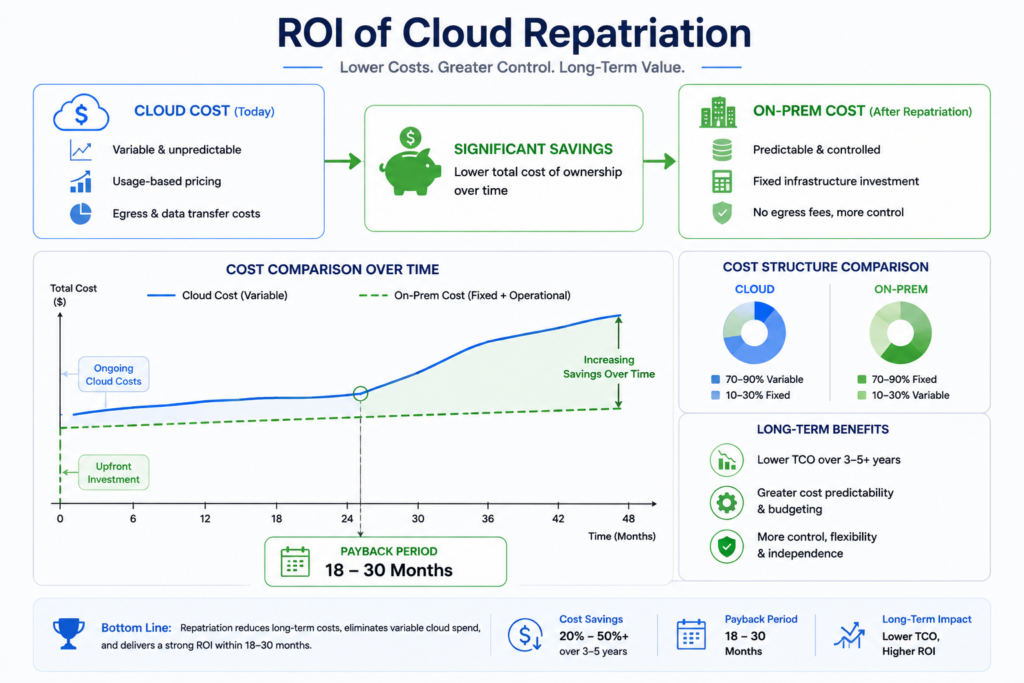
Cloud repatriation converts variable cloud compute charges into fixed CapEx with a defined payback curve. For workloads at 85%+ utilization, on-premises vs cloud cost comparison delivers 55 to 70% infrastructure cost reduction over three years.
Mid-market cloud repatriation environments reach payback in 18 to 30 months. A simple FinOps formula makes this concrete:
Moving workloads back on-premises turns a recurring operating expense into a one-time capital decision with a predictable return.
For regulated industries, cloud repatriation eliminates third-party audit overhead, DPA legal reviews, and annual compliance reporting costs that never appear in cloud bills but consume real budget.
Cloud repatriation for base load, with public cloud retained for burst, is the operational model that works. Hybrid infrastructure delivers on-premises cost efficiency at steady state while keeping cloud elasticity for demand spikes.
The biggest technical risk in cloud repatriation is discovering mid-project that applications depend on cloud-native PaaS services with no on-premises equivalent.
Signs re-architecture risk is high:
Every cloud exit strategy must include re-architecture scoping before hardware procurement begins.
Moving workloads back on-premises requires physical infrastructure management, on-premises network architecture, and storage administration. Most cloud-native engineering teams lack all three. Organizations that skip this gap assessment rebuild cloud dependency within 12 months.
Every production workload in a cloud repatriation project needs a defined rollback trigger before cutover. Specific latency thresholds, error rates, or data integrity failures should automatically pause migration and restore cloud operation.
Cloud provider contracts contain exit clauses that most teams never read before signing. Early termination fees, data portability SLAs, and support minimums all affect the true cost of a cloud exit strategy. Legal review of MSA terms is not optional before serving the exit notice.
Before signing any contract for cloud repatriation services, confirm:
A vendor that cannot produce a completed TCO model comparing on-premises vs cloud cost before project kickoff is not qualified to lead a repatriation program.
A mid-market infrastructure partner delivering end-to-end cloud repatriation projects from workload assessment through operational handover, focused on engineering-led organizations that need production outcomes fast.
Key Features:
Best For: Mid-market organizations spending $300,000 to $2M annually on cloud infrastructure with 30%+ steady-state workload concentration.
Client Review: 4.8/5
A managed services provider with a dedicated repatriation practice supporting moving workloads back on-premises and colocation across enterprise environments.
Key Features:
Best For: Enterprises that want managed infrastructure post-cloud repatriation without building internal operations capability.
Client Review: 4.5/5
Overview: A network and infrastructure provider offering cloud repatriation services anchored in its own colocation and private network infrastructure across North America and Europe.
Key Features:
Best For: Organizations with high-bandwidth, latency-sensitive workloads where network performance is the primary repatriation driver.
Client Review: 4.4/5
A private cloud and colocation provider specializing in cloud repatriation for regulated industries, including healthcare, financial services, and government.
Key Features:
Best For: Regulated industry organizations where compliance is the primary cloud repatriation driver.
Client Review: 4.5/5
A managed cloud and infrastructure provider offering hybrid infrastructure services for organizations executing partial repatriation while retaining burst capacity in public cloud.
Key Features:
Best For: Organizations executing a partial cloud exit strategy that retains public cloud for burst and DR while repatriating base load.
Client Review: 4.4/5
We deliver cloud repatriation projects to production in 3 to 5 months. Most organizations budget 9 to 12 months managing it internally.
Three things that make our work different:
Turn predictable workloads into predictable savings. Let's run the numbers together.
Cloud repatriation has moved from a niche decision to a mainstream infrastructure strategy. Gartner and IDC both project sustained growth in on-premises and private cloud investment through 2027. Base the decision on workload utilization patterns, Every cloud exit strategy must include egress cost modeling before the first byte moves.compliance requirements, and a clear total cost of ownership model.
Organizations spending over $500,000 annually on cloud with predictable base-load workloads owe themselves a formal repatriation assessment before their next renewal cycle. Get a scoped cloud exit strategy estimate from Patoliya Infotech before that conversation starts.