Table of Contents
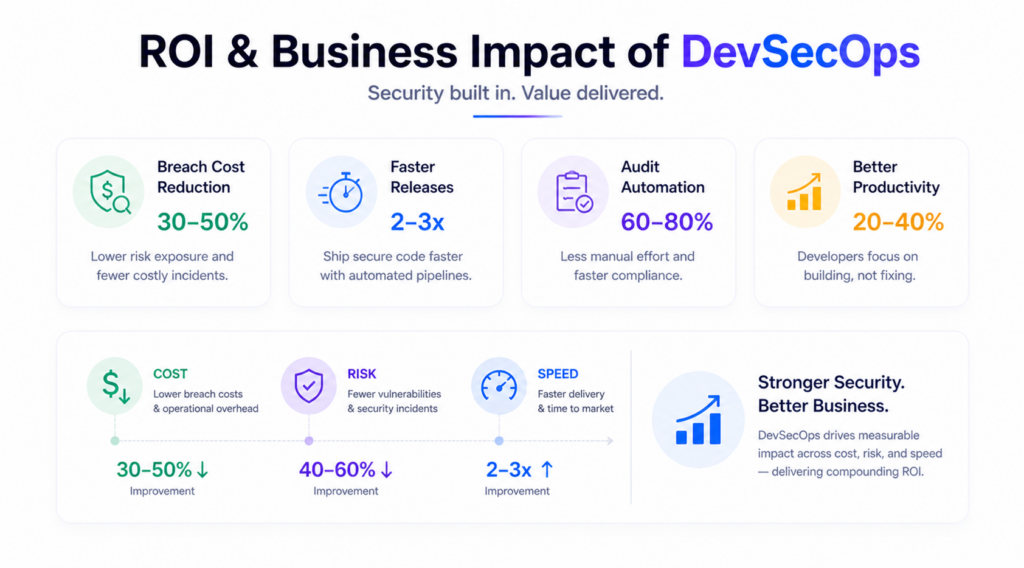
TLDR: DevSecOps integrates security testing directly into CI/CD pipelines instead of treating it as a final gate before release. Security handled after deployment is already a risk multiplier. When code is reviewed only at the end, issues are discovered too late, when the cost and impact are higher.
Security reviews after deployment are not real reviews. They signal gaps in the process. A structured DevSecOps program shifts security into every stage, reducing exposure, improving control, and preventing issues before they reach production.
It is an operating model that treats security as a shared engineering responsibility, not a compliance handoff. Most teams that struggle with it are not missing tools; they are missing a DevSecOps pipeline architecture that makes security enforcement automatic. This guide covers what it costs, how it works, and which vendors actually deliver.
DevSecOps embeds automated security controls at every delivery stage so vulnerabilities are caught before they become production incidents.
The word "embeds" matters here. Every commit triggers security checks defined by security as code policies. Developers get feedback in the same environment where they write code.
The model it replaces is security at the gate, and an AppSec team reviewing code right before release. That creates a backlog and finds vulnerabilities too late. IBM estimates that fixing a vulnerability in testing costs 15x more than fixing it at the code stage.
DevOps optimizes for speed. AppSec works in isolation after code is written. The practice merges both security runs automatically in the pipeline, and developers' own remediation.
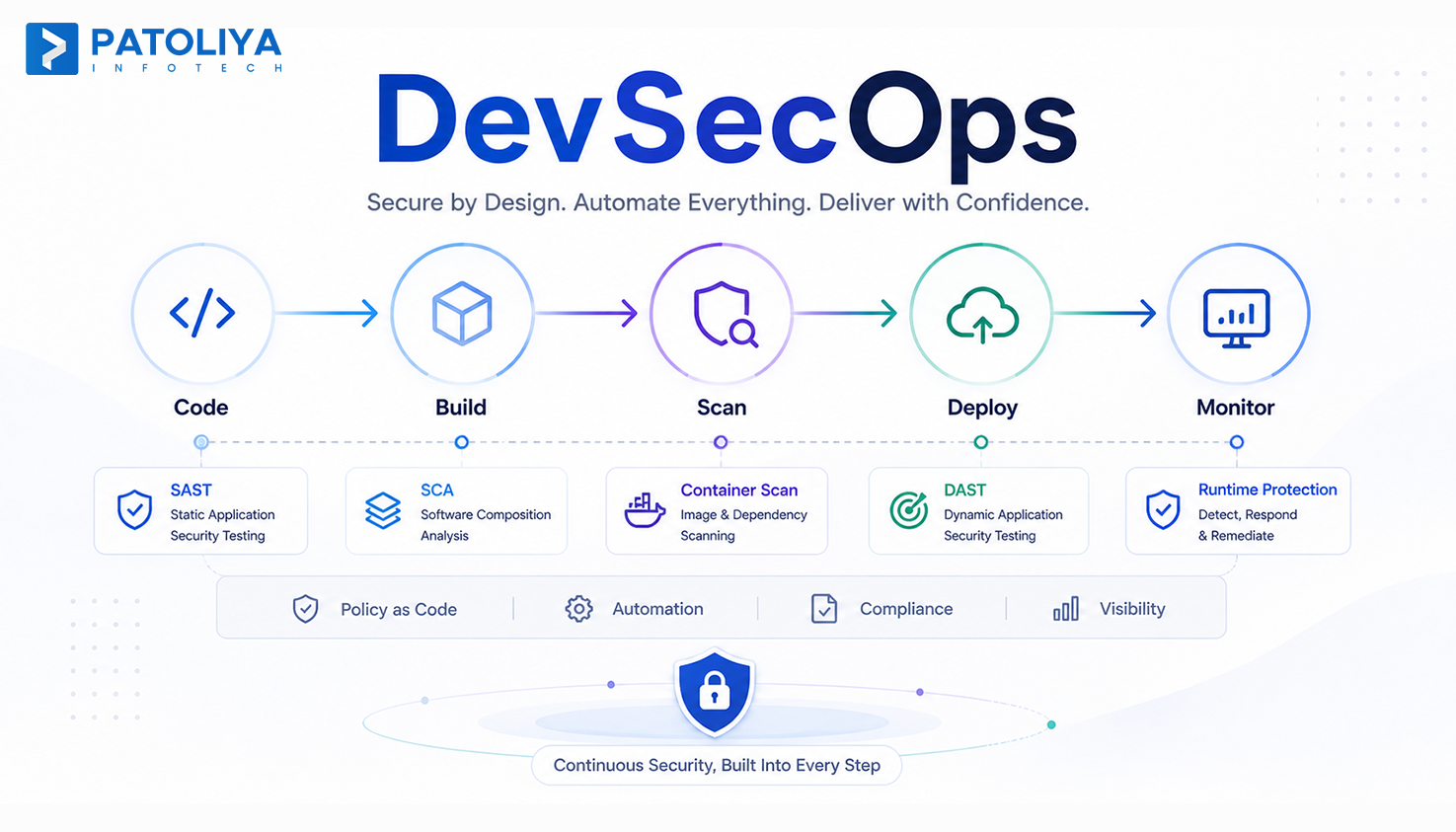
It touches every phase: SAST DAST integration at code commit, dependency scanning at build, container security scanning during packaging, and policy enforcement at deployment.
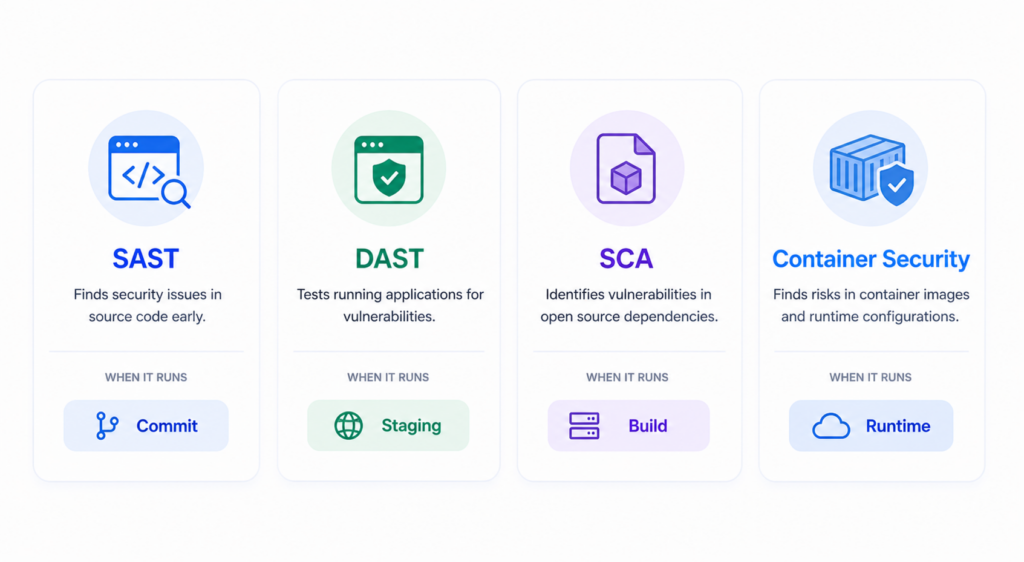
SAST scans source code without executing it, finding injection flaws and hardcoded credentials. In a mature build, tools like Semgrep and SonarQube run in under two minutes. In a mature pipeline, a failing SAST gate blocks a merge request the same way a failing unit test does. Target false positive rate: under 15%.
DAST tests running applications by simulating outside attacks. It catches runtime vulnerabilities that static analysis cannot see. Tools here run best in staging on a nightly schedule, not every commit, where latency creates friction.
SCA scans open source dependencies for known CVEs. The 2024 Sonatype report found 245,000 malicious packages published to open source repositories in 2023. DevSecOps tools running SCA inside the pipeline block builds when a dependency carries a critical CVE.
DevSecOps tools like Trivy and Aqua handle container security scanning at image build time. Checkov scans infrastructure configurations before they reach production. The tools here prevent the most common cloud breach vector: misconfigured permissions.
HashiCorp Vault integrates at the pipeline level and blocks deployments with exposed credentials. Security as code policies run here automatically.
When the security team is a gate, delivery slows. The DevSecOps pipeline moves security checks earlier so development and security run in parallel, not in sequence. Every stage of the pipeline is a checkpoint, not a bottleneck. Teams that implement shift-left security properly report no increase in release cycle time.
Code reaching production without automated scanning carries vulnerabilities that auditors find months later. By then, the fix requires patching production and retesting. A continuously running pipeline with SAST, DAST, and SCA catches vulnerabilities before code ships; that is, the DevSecOps pipeline is functioning as designed.
SOC 2, PCI-DSS, HIPAA, and ISO 27001 all require evidence of security controls. Manual processes generate documentation that is incomplete and hard to reproduce under audit. Security as code policies map compliance controls directly to pipeline checks. Compliance automation built into the pipeline generates timestamped evidence automatically.
SolarWinds and Log4Shell proved that the biggest attack surface is not your code, it is the dependencies your code pulls in. Software supply chain security via SCA in the pipeline is the only scalable answer.
Most engineering organizations sit on a four-stage maturity curve: ad hoc security, DevOps without security automation, DevSecOps with automated gates, and SecDevOps with embedded security architects. Most teams that claim this maturity are actually at stage two.
| Dimension | Traditional AppSec | DevOps Only | DevSecOps |
| Security timing | After development | None automated | Every pipeline stage |
| Who owns fixes | Security team | Development team | Development team with guidance |
| Compliance evidence | Manual | None | Automated artifacts |
| Velocity impact | High, blocks releases | Zero | Low when tuned |
| Tools used | Point tools only | None | Integrated toolchain |
Building a DevSecOps pipeline in-house works for teams with dedicated security engineers. Commercial platforms bundle most of what a pipeline needs. Managed partners handle the build for teams without internal security capacity. Security as code policy definitions live alongside application code in the same repository.
A toolchain built on open source DevSecOps tools like Semgrep, OWASP ZAP, Trivy, Checkov, and HashiCorp Vault costs $15,000 to $45,000 in implementation labor. Ongoing maintenance requires at least one engineer who owns the toolchain. The real cost is tuning: false positive suppression takes significant ongoing time.
GitLab Ultimate, Snyk, and Veracode bundle SAST, DAST, SCA, and container security scanning in a single platform. For a 50-developer team, commercial tool licensing runs $60,000 to $150,000 per year. Most mid-market teams recover platform costs within 18 months through reduced remediation spend.
A managed implementation where a partner builds and tunes the full pipeline runs $40,000 to $200,000, depending on stack complexity. Ongoing managed retainers run $8,000 to $25,000 per month.
Contract Models and Negotiation Considerations
Fixed scope contracts work for Tier 1 and Tier 2 builds. Managed service retainers almost always run on time and materials. Budget a 15% contingency. The biggest cost surprises come from legacy CI/CD platforms that need custom connectors for security tooling.
Checklist Item 1 - CI/CD Platform Compatibility
Checklist Item 2 - SAST, DAST, SCA Tool Coverage
Checklist Item 3 - Container and Cloud Native Security Capability
Checklist Item 4 - Compliance Framework Coverage
Checklist Item 5 - False Positive Rate Benchmarks
Checklist Item 6 - Mean Time to Notify on Critical CVEs
Checklist Item 7 - Developer Experience and IDE Integration
Checklist Item 8 - Audit Ready Reporting and Evidence Packaging
Checklist Item 9 - Pricing Transparency and Licensing Model
Checklist Item 10 - Reference Clients in Your Industry Vertical
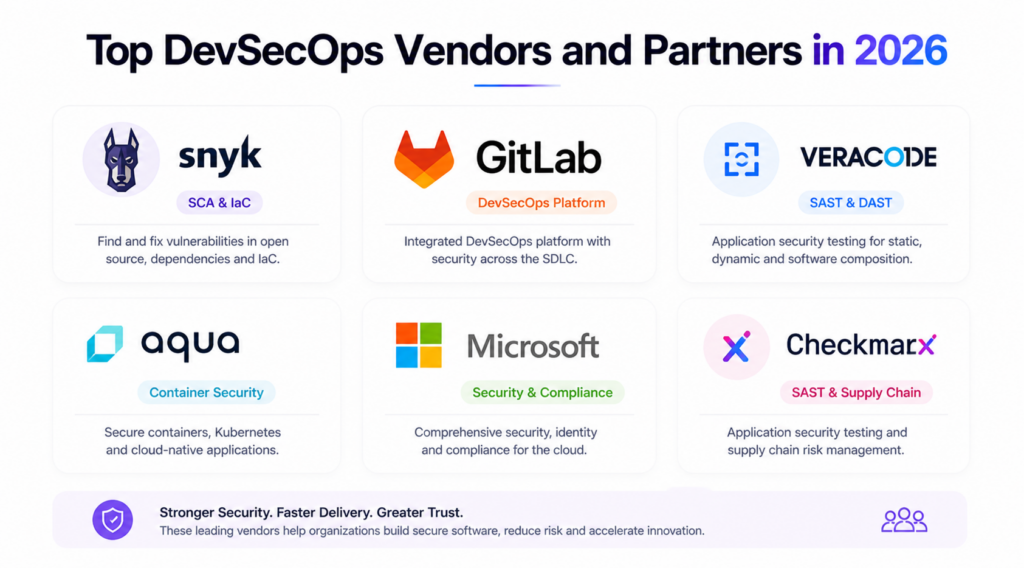
The market splits into platform providers, point tool specialists, and implementation partners.
Patoliya Infotech designs and implements DevSecOps pipelines for mid-market and enterprise clients across fintech, healthcare, and SaaS sectors, where strict compliance requirements demand security as code, audit-ready controls, and tightly integrated tools.
Key capabilities:
Best for: Organizations needing a ready for production program with compliance coverage and no internal security engineering capacity.
Client review: 4.8/5
Snyk leads in SCA with tools built around the developer experience.
Key capabilities:
Best for: Developer teams wanting security feedback in the IDE, not just in CI.
Client review: 4.7/5
Veracode is an enterprise SAST and DAST platform with the strongest security as code compliance reporting in this space.
Key capabilities:
Best for: Regulated enterprises needing auditable compliance evidence annually.
Client review: 4.5/5
GitLab Ultimate bundles secure CI/CD and DevSecOps tools in one platform, eliminating integration overhead.
Key capabilities:
Best for: Teams already on GitLab wanting security automation without added tools.
Client review: 4.6/5
Aqua specializes in container and cloud native security with DevSecOps tools that go deeper than general platforms on Kubernetes risk.
Key capabilities:
Best for: Kubernetes environments where container security is the primary risk surface.
Client review: 4.7/5
We stay after delivery and have built DevSecOps pipelines on GitHub Actions, GitLab CI, Jenkins, and Azure DevOps with pre-configured rule sets.
Every pipeline they deliver maps security as code policies to compliance frameworks. Every security as code asset lives in version control. Auditors get evidence artifacts, not spreadsheets.
Ready to move from manual AppSec to a production DevSecOps program? Let's talk.
It is an architecture decision, not just a product purchase. Organizations that succeed embed security as code into the DevSecOps pipeline from the start, while designing for a strong developer experience. This ensures security is enforced without slowing delivery.
The DevSecOps tools ecosystem is mature, and capable vendors are available. What matters is how early and effectively security is integrated. Treating security as a post-deployment step creates risk, delays fixes, and increases costs. In modern systems, it must be built into the pipeline, not added after release.
If you are planning to implement or optimize your DevSecOps pipeline, connect with the team to get a scoped, security-first approach aligned with your architecture and compliance needs.