API Integration Explained Roles and Benefits
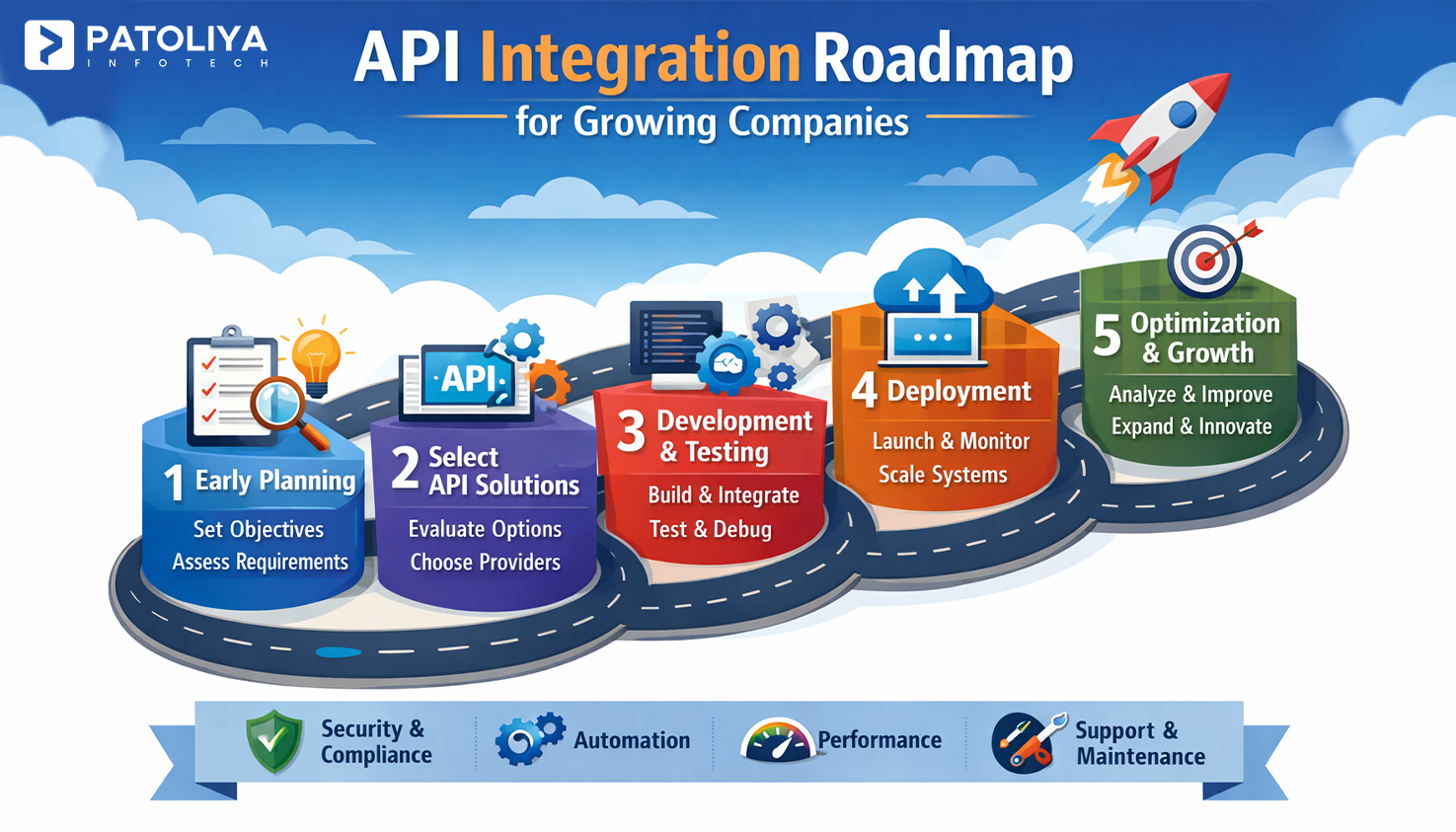
Table of Contents
Every time you receive an order confirmation, track a delivery, or get a personalized recommendation, API integration is working silently behind the scenes. As businesses adopt more software tools like CRMs, payment gateways, marketing platforms, logistics systems, and connecting them efficiently has become a critical operational need. Disconnected systems create data silos, manual errors, and slow workflows that cost time and money.
API integration solves this by enabling applications to communicate, share data, and trigger actions automatically in real time. Many organizations work with a reliable custom software development company to design secure and scalable integration architectures from the ground up. In this guide, you will learn what API integration is, how it works, its role across industries, real-world examples, measurable benefits, a step-by-step process, common challenges, and best practices for successful implementation.
What is API Integration
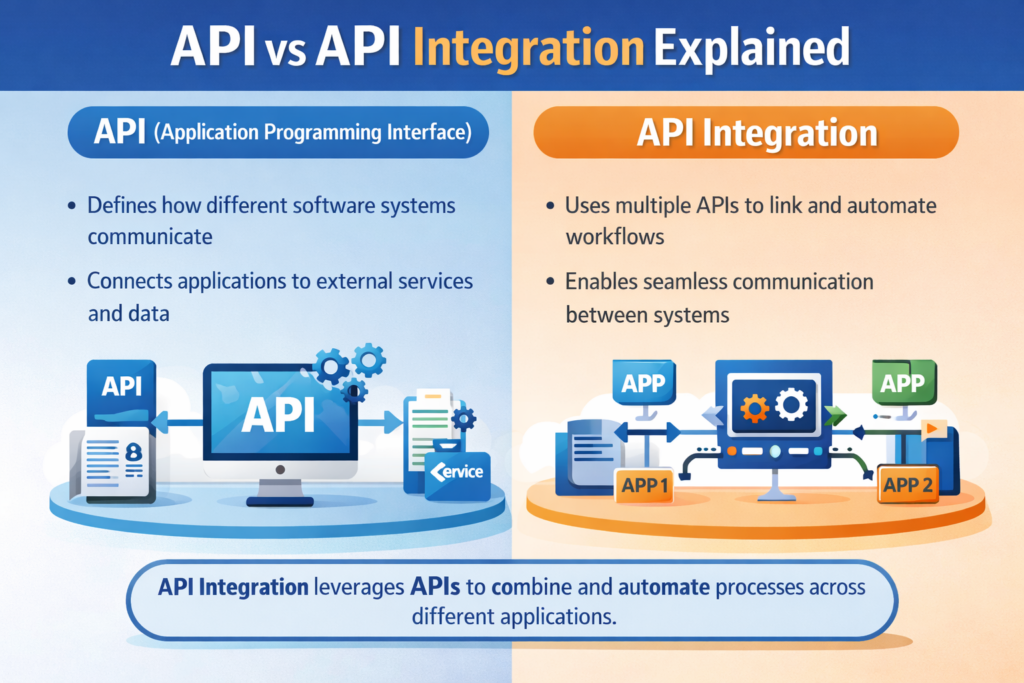
API definition of integration is the process of connecting two or more software applications through their APIs so they can share data and functions automatically without manual input. Instead of switching between platforms or exporting files, API integration keeps your systems in sync in real time.
API vs API Integration
An API (Application Programming Interface) is a set of rules that allows one software to talk to another. API integration is the actual implementation of that connection. Think of an API as a power socket and API integration as plugging in the device. The API defines how communication happens; the integration makes it happen in a live system.
How API Integration Works
When a user triggers an action, the system sends a request to an API endpoint with the required data. The receiving system processes the request and sends back a response.
For instance, when you place an order online, your store's system calls a payment API, which processes the transaction and returns a confirmation. This entire API integration process happens in milliseconds through structured request and response cycles.
Types of API Integration
There are four main types:
- Internal – connects systems within the same organization
- External – links your system with a partner or vendor
- Third-party – uses public APIs like Google Maps or Stripe
- Composite – chains multiple API calls into one workflow
Each type of API integration serves a different purpose in how API integration works, depending on the scope and direction of data exchange.
Role of API Integration in Business and Technology
API integration plays a central role in how modern businesses operate. It connects tools, automates workflows, and removes the need for manual data handling. Whether it is syncing customer records or triggering automated reports, API integration keeps business systems aligned and responsive.
Role in Digital Transformation
Digital transformation depends on connected systems, and API integration is what enables that connectivity. Companies replacing legacy processes with digital workflows use API integration to link CRMs, ERPs, marketing tools, and customer portals into one unified ecosystem. Without it, each system operates in isolation, creating data gaps and delays that slow down the entire digital transformation effort.
Role in Product Development
Development teams use API integration to add features faster without building everything from scratch. Need payment processing? Integrate Stripe. Need maps? Use Google Maps API. This approach shortens development cycles significantly.
By plugging in existing APIs, teams focus on their core product while API integration handles the supporting functionality reliably and at scale. Modern web application development services rely heavily on structured API integration to ensure seamless connectivity between internal systems and third-party platforms. Following API integration best practices at this stage ensures every added feature connects securely and performs consistently in production.
Role in Enterprise Systems
In large organizations, departments use different platforms like HR, finance, logistics, and sales, each have their own tools. Enterprise API integration connects these systems so data flows across departments without duplication. Applying API integration best practices across enterprise systems ensures this data flow remains accurate, secure, and scalable as the organization grows.
For instance, when a sale is closed in the CRM, API integration can automatically update inventory and trigger invoicing, eliminating the need for manual coordination.
Real World API Integration Examples
API integration examples and API use cases across industries show how businesses automate workflows, eliminate manual effort, and connect platforms that would otherwise operate in silos. Here are some of the most practical API integration examples that demonstrate real business impact.
Ecommerce and Payment Systems
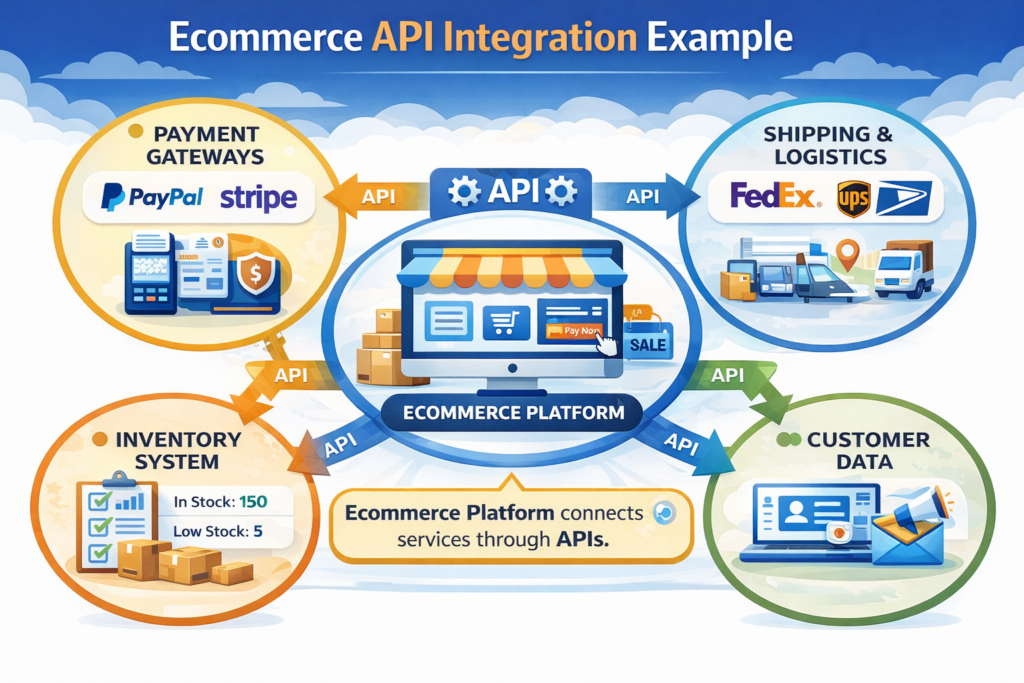
An online store integrates a payment gateway like PayPal or Razorpay to process transactions securely. Alongside that, API integration with a logistics provider like FedEx automatically generates shipping labels and sends tracking updates to customers.
Both integrations run in the background, giving shoppers a seamless checkout and delivery experience without any manual effort from the store team. This is one of the most visible API integration benefits for ecommerce businesses operating at scale.
CRM and Marketing Automation
When a lead fills out a form on your website, API integration can instantly push that contact into your CRM, add them to an email sequence in Mailchimp, and notify the sales team on Slack. Following API integration best practices at this stage ensures customer data is mapped correctly, transferred securely, and remains consistent across every platform involved in this connected workflow. This connected workflow removes manual data entry, ensures faster follow-up, and keeps customer data consistent across platforms.
SaaS and Cloud Platforms
SaaS products like Slack, Zoom, and HubSpot are built on API integration. They offer open APIs so businesses can connect them with their own tools.
A project management tool might integrate with Google Calendar for scheduling and with Jira for issue tracking, creating a connected workspace that improves team productivity through API automation.
API Integration Benefits
Automation and Efficiency
One of the most measurable API integration benefits is automation. Tasks that once required manual data entry or file exports are handled automatically through integrated systems.
For instance, orders placed on your website can trigger inventory updates and invoice generation simultaneously, saving hours of repetitive work and reducing the chance of human error.
Improved Data Accuracy
When systems are connected through API integration, data entered in one place reflects everywhere else instantly. API integration benefits include eliminating duplicate records, outdated entries, and inconsistencies caused by manual syncing.
For instance, a customer address updated in your CRM automatically reflects in your billing and shipping system without any extra steps.
Scalability and Flexibility
API-driven systems scale without requiring full rebuilds. This scalability becomes even more powerful when combined with cloud native applications built on modular and containerized architectures.
As your business grows, you can add new integrations or replace existing tools without disrupting the core system. This flexibility is a key API integration benefits for growing companies that need to move fast, adopt new platforms, and adjust workflows without extensive development effort.
Better Customer Experience
Customers experience the results of API integration directly, like faster checkouts, real-time order updates, personalized recommendations, and instant support responses. When your backend systems communicate seamlessly following API integration best practices, customers never see delays caused by manual processes. The API integration benefits your business implements internally reflect directly in a smoother, more reliable experience at every customer touchpoint.
API Integration Process Step by Step

Requirement Analysis
The API integration process begins with defining what you need to connect, why, and what data needs to flow between systems.
Identify the source system, the target system, trigger events, and expected outcomes. Clear requirement analysis prevents scope creep later. Document every data point that needs to be exchanged before writing a single line of code.
API Selection and Documentation Review
Evaluate available APIs based on reliability, documentation quality, support, and rate limits. Good API documentation is a sign of a mature, maintainable product. Review authentication methods, available endpoints, error codes, and response formats before committing. Selecting the wrong API at this stage leads to rework and integration failures down the line.
Development and Testing
Build the integration by connecting endpoints, mapping data fields, and handling errors gracefully. Test every scenario, including failed responses, empty data sets, and timeout conditions. Use sandbox environments provided by most API vendors before going live. Detailed testing during this phase ensures you can fully realize the API integration benefits your business expects without costly bugs surfacing in production.
Monitoring and Maintenance
Post-launch, monitor API performance continuously using tools like Datadog or New Relic. Track response times, error rates, and usage volumes. APIs change like vendors release new versions and deprecate old ones. Regular maintenance is what keeps the API integration benefits of speed, accuracy, and reliability intact over the long term.
Common API Integration Challenges
Security Risks
Every API integration point is a potential entry for unauthorized access. Exposed API keys, weak authentication, and unencrypted data transfers are common API security vulnerabilities. Using HTTPS, rotating credentials regularly, and implementing IP whitelisting are basic steps to reduce risk and protect sensitive data flowing through integrated systems.
Versioning and Compatibility
APIs evolve. When a provider releases a new version or retires old endpoints, integrations built on those endpoints can break. Managing API versioning requires monitoring vendor changelogs, building version-tolerant code, and testing integrations after any upstream update. Without a versioning strategy, even a minor API change can cause significant system downtime.
Performance Bottlenecks
Heavy API usage can introduce latency, especially during traffic spikes. If a third-party API responds slowly, it slows your entire workflow. Mitigate this through caching repeated responses, using asynchronous calls where possible, and setting request timeouts. Monitoring API performance metrics regularly helps identify bottlenecks before they affect end users or business operations.
API Integration Best Practices
Use Secure Authentication Methods
Always use OAuth 2.0 framework or token-based authentication rather than basic username and password methods. Tokens expire and can be revoked, reducing risk if compromised.
Following these API integration best practices ensures that only authorized systems can access your endpoints and that access can be controlled and audited at any time.
Maintain Clear API Documentation
Documentation is essential. Keep your API documentation updated whenever endpoints change, new parameters are added, or authentication methods are updated.
Many teams follow the OpenAPI specification to standardize API documentation and improve maintainability.
Well-maintained documentation helps developers onboard faster, reduces integration errors, and makes troubleshooting significantly easier. Outdated documentation is one of the most common sources of failed or broken API integration projects and api integration best practices.
Implement Robust Testing
Testing is a non-negotiable API integration best practices. Implement unit tests for individual endpoints, integration tests for complete data flow, and regression tests after any update. Automated testing tools like Postman or REST Assured can run test suites continuously. Catching failures early in the testing phase costs far less than fixing them in production.
Monitor and Log API Activity
Real-time monitoring helps you detect anomalies, performance drops, and unauthorized access attempts before they escalate.
Log every API request and response with timestamps and status codes. Use dashboards to track error rates and latency trends.
Consistent monitoring and logging is an API integration best practices that directly supports reliability, security, and faster incident resolution.
Why Choose Patoliya for API Integration Expertise
Patoliya brings hands-on experience across hundreds of API integration projects spanning ecommerce, healthcare, finance, and SaaS platforms. Their team works with REST, SOAP, and GraphQL APIs using structured delivery frameworks that reduce implementation risk.
Security-first practices, detailed API documentation standards, api integration best practices and post-launch monitoring support are built into every engagement. Clients choose Patoliya because they deliver working, scalable integrations on time, not just technical proposals. From requirement scoping to go-live, Patoliya manages the entire API integration process.
Conclusion
API integration is a business necessity. It connects your tools, automates your workflows, and delivers API integration benefits that both teams and customers experience every day. Understanding the API integration process, recognizing common API challenges, and applying proven API integration best practices are what separate successful implementations from costly failures. Whether you are a startup adding your first payment gateway or an enterprise unifying cross-departmental systems, the right API integration strategy determines how efficiently your business operates and how quickly it can grow.
FAQs
What is API integration in simple terms?
API integration is connecting two software systems so they can automatically share data and work together. For example, when your ecommerce store sends an order confirmation email automatically after purchase, that is API integration at work.
Why is API integration important for businesses?
It eliminates manual work, keeps data consistent across tools, and enables automation at scale. Businesses that use API integration respond faster, make fewer errors, and deliver better customer experiences than those relying on disconnected systems.
What are the main API integration benefits?
The key API integration benefits include workflow automation, improved data accuracy, faster product development, system scalability, and better customer experience. all of which contribute directly to operational efficiency and business growth.
How secure is API integration?
API integration can be highly secure when built correctly. Using OAuth 2.0, HTTPS encryption, token-based access, and regular API security audits ensures that data exchanged between systems is protected against unauthorized access and breaches.
What tools are used for API integration?
Common API integration tools include MuleSoft, Zapier, Postman, Dell Boomi, AWS API Gateway, and Microsoft Azure API Management. The right tool depends on your technical environment, scale, and the complexity of the integration required.
How long does API integration take?
A simple API integration can take a few hours to a couple of days. Complex enterprise API integration involving multiple systems, custom data mapping, and security requirements can take several weeks. Timelines depend on API documentation quality, team expertise, and testing scope.