Table of Contents
If you've spent any time researching automation tools in 2026, you've probably landed on a dozen scattered articles, one comparing n8n to Zapier, another explaining AI agent nodes, a third covering self-hosting with Docker. None of them give you the complete picture. This guide consolidates everything you need to know about n8n workflow automation into one authoritative resource: what it is, how it works, how it compares to alternatives, real business use cases, setup steps, security considerations, and how to decide if it's right for your organization.
Whether you're a founder trying to cut SaaS costs, a developer building AI-native pipelines, or an operations lead exploring no-code workflow automation, this guide is built to answer every question in one place, so you don't have to keep six browser tabs open.
n8n (pronounced "n-eight-n," short for "nodemation") is a fair-code licensed workflow automation tool developed by a German software company, offering a visual programming approach to connecting apps and services. It supports both a self-hosted deployment and a managed cloud service, giving teams a choice between full infrastructure control and convenience.
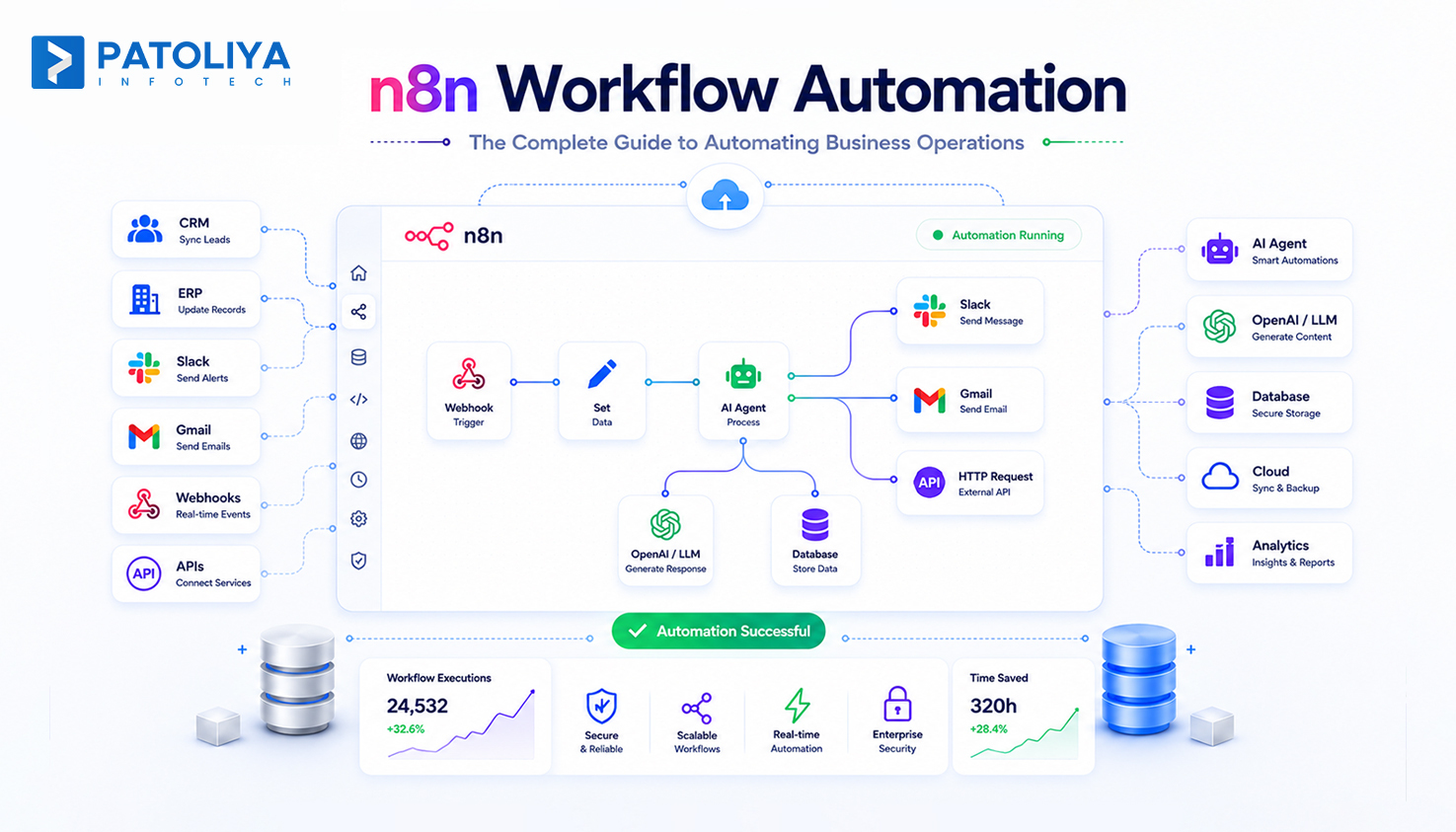
At its core, an n8n workflow automation platform lets you connect apps, databases, and AI models through a drag-and-drop visual canvas, while still allowing developers to drop in JavaScript or Python whenever native nodes aren't enough. This dual nature, accessible enough for non-technical users, extensible enough for engineers, is why n8n workflow automation has become one of the fastest-growing names in the automation space.
By 2026, n8n has evolved from a simple task-connector into what many now call an AI orchestration platform, letting teams build workflow automation platform experiences that combine LLM calls, vector database lookups, and autonomous AI agent node logic without writing custom orchestration code from scratch.
Most legacy automation tools charge per task or per "zap," which quietly punishes you the moment your workflows scale. n8n flips that model. Because n8n workflow automation runs on execution-based pricing and can be self-hosted on a small VPS, a twenty-step workflow costs the same to run as a two-step workflow, you're paying for server time, not the number of operations.
That single design choice explains much of its momentum. Industry write-ups note that n8n has crossed 200,000 active users and multiplied its annual recurring revenue several times over in the past year, driven largely by word-of-mouth from technical teams who ran the cost math against per-task pricing models.
Beyond pricing, three things set n8n workflow automation apart:
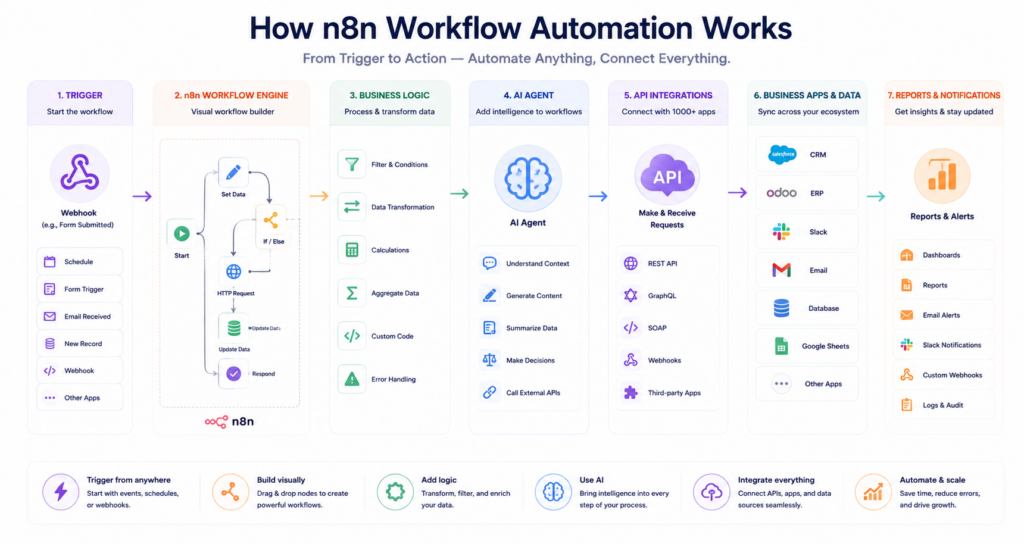
The canvas-based editor lets you see inputs and outputs at every step, execute a single node without re-running the whole sequence, and replay data instead of re-triggering live events, a workflow experience built for fast iteration rather than one-shot automation.
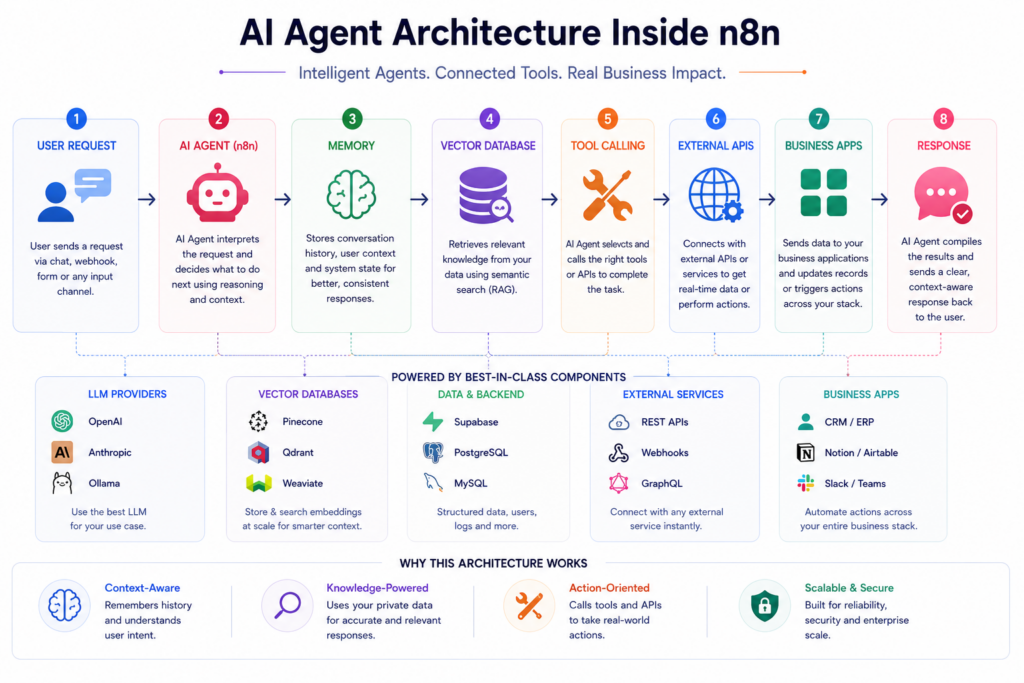
This is arguably the biggest shift in the platform. n8n now ships with LLM chains that connect models like OpenAI, Anthropic, Google, and Ollama to structured prompts with output parsing, along with autonomous AI agents that support tool use, memory, and multi-step reasoning. It also includes native support for vector stores such as Qdrant, Pinecone, and Supabase for retrieval-augmented generation workflows, plus embeddings generation and document loaders that ingest PDFs, web pages, and databases directly into AI pipelines. For teams exploring generative AI development services, this turns n8n into a legitimate AI backend, not just a connector tool.
Unlike closed, cloud-only platforms, n8n supports a fully self-hosted deployment model, so engineering teams retain complete control over where automation runs, how data is processed, and how compliance requirements are met. This self-hosted automation flexibility is a major reason security-conscious industries - healthcare, fintech, legal gravitate toward it.
Native connectors cover the most common business apps, and when a specific SaaS tool isn't natively supported, the HTTP Request node lets you connect to virtually any API, closing the gap that fully closed platforms can't.
JavaScript and Python nodes can be dropped in anywhere in a workflow, letting technical teams handle edge cases, custom transformations, or business logic that a purely visual builder can't express, a defining feature of a true integration platform built for engineers.
Choosing between automation platforms usually comes down to three questions: who's building the workflow, how complex is it, and how much does scale cost?
| Factor | n8n | Zapier | Make |
| Pricing model | Self-hosted (server cost only) or execution-based cloud | Per-task, scales expensively | Per-operation |
| Native integrations | 400+ (unlimited via HTTP) | 8,000+ | Thousands |
| AI/agent capability | Deep, LangChain-native | Add-on style | Moderate |
| Best for | Technical teams, developers, AI pipelines | Non-technical founders needing fast setup | Mid-complexity business automation |
| Learning curve | Steeper | Gentle | Moderate |
As one comparison puts it plainly: if you're a non-technical founder who just needs to connect Shopify to Mailchimp in fifteen minutes, Zapier will likely serve you better, n8n has a steeper learning curve and requires managing your own infrastructure unless you pay for the managed cloud. But the platform's sweet spot is technical teams running ten or more workflows who need custom code steps, internal API integrations, or AI agent pipelines where per-execution SaaS pricing becomes prohibitively expensive at scale.
If your team is weighing autonomous agents against simpler trigger-and-actions automation, our breakdown of AI agents vs. workflow automation goes deeper into that decision.
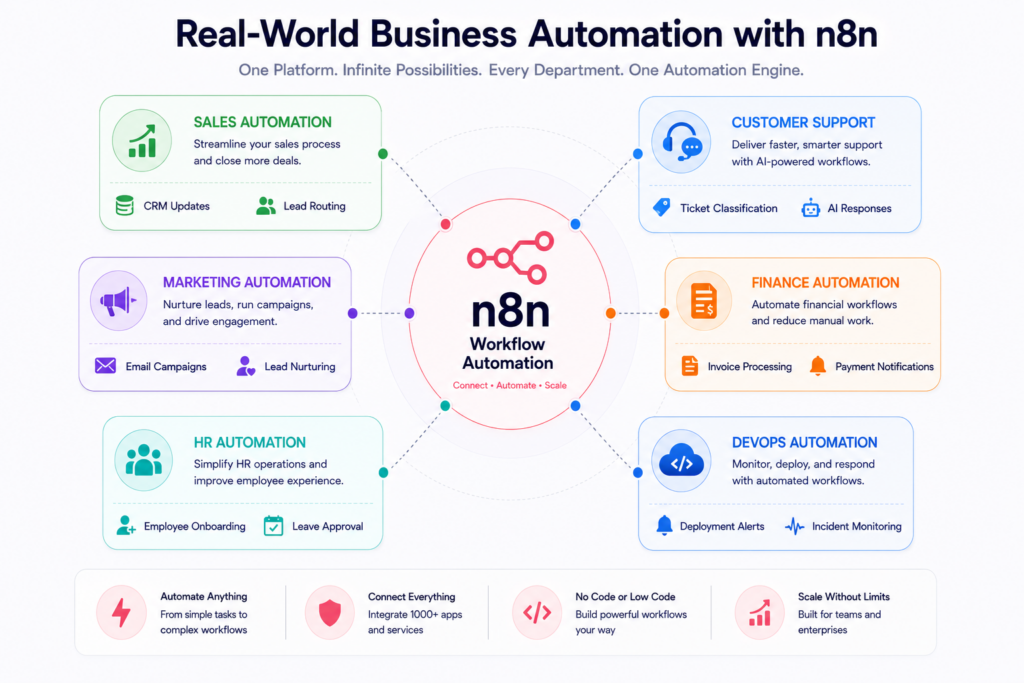
Customer support triage - Support tickets are ingested automatically, an LLM classifies intent and urgency, tickets route to the correct team, and an AI-drafted response waits for human review before sending.
Internal data dashboards - Workflows query multiple internal databases on a schedule, transform the results with a code node, and push clean output to Google Sheets or Notion for leadership visibility.
Sales and CRM automation - Deal status changes trigger downstream actions automatically: updating CRM records, notifying account teams, and syncing data across finance and support systems in real time.
Document and content automation - PDFs, contracts, and reports are parsed, summarized, and routed by AI nodes, cutting down manual document handling. See our related document automation with AI guide for a deeper dive.
DevOps and IT operations - Deployment pipelines, incident alerts, and infrastructure monitoring get wired into automated workflows, which pairs naturally with a broader DevOps consulting strategy. If you're specifically comparing tooling in this space, our piece on AI tools for DevOps is a useful companion read.
If your team wants a broader primer on how AI models are being connected to tools and workflows across the industry, our explainer on the Model Context Protocol (MCP) is a helpful next read.
Security is where many low-code tools fall short, but n8n was built with enterprise deployment in mind. Enterprise-grade instances support a fully on-premise option, SSO with SAML, and LDAP, encrypted secret stores, version control, and RBAC permissions, along with audit logs, log streaming to your SIEM, workflow history, real-time alerts, and usage dashboards.
For AI agent deployments specifically, best practice includes limiting agents to only the data they need, applying least-privilege access, masking sensitive fields, and rotating credentials through dedicated secret managers rather than storing keys directly in a database. Combined with self-hosted automation, this makes n8n a credible option even for regulated industries like healthcare and finance.
Cost is often the deciding factor between automation platforms, and it's worth being precise about it.
This cost structure is precisely why so many teams researching no-code workflow automation eventually migrate from task-based platforms once their workflow complexity, and their bills, start climbing.
Choose n8n if:
Look elsewhere if:
Understanding n8n conceptually is one thing, deploying it securely, integrating it with your existing stack, and building reliable AI agents on top of it is another. Our n8n workflow automation services cover end-to-end implementation: architecture planning, self-hosted deployment, custom node development, and AI agent design tailored to your business processes.
For teams building broader AI capability alongside automation, our AI consulting services and custom AI software development guide pair naturally with an n8n implementation, helping you go from a single automated workflow to a fully AI-native operations backbone.
If you're ready to explore what a tailored n8n workflow automation setup could look like for your business, get in touch with our team for a scoped conversation.
n8n workflow automation has matured from a Zapier alternative into a serious AI orchestration platform, one that gives technical teams the visual speed of no-code workflow automation without sacrificing the control, extensibility, and cost efficiency that growing businesses eventually need. Whether you're automating support triage, building internal dashboards, or deploying autonomous AI agents, the platform scales with your ambition rather than your budget.
The right next step depends on your team's technical capacity and how quickly you expect your automation needs to grow, and that's exactly where a scoped conversation with an implementation partner can save you months of trial and error.